

Start with the agency, not the phrase
The expression used in your search can point to different government systems, so the agency connected to your matter comes first. A USCIS benefit application and an immigration-court proceeding do not use the same online path. Before you create an account, sign in, or try to connect a case, identify the agency named on your notice, receipt, court document, or other official correspondence.
Your document should guide the first decision. Ask yourself:
- Which agency issued or refers to the document?
- Does it concern a USCIS application or petition, or does it refer to proceedings before the Executive Office for Immigration Review?
- Are you trying to receive case alerts, manage a USCIS case, view court information, file a court document, or complete another task?
- Does the document concern the United States, or does it come from an authority in another country?
If the matter belongs to another country or another authority, use that authority’s own official account instructions rather than assuming that a U.S. system applies.
An online account is a way to reach information, notices, messages, or case-related functions offered by an agency. It is not, by itself, an answer about eligibility, status, deadlines, or the likely result of your matter. Choose the responsible agency first; only then should you follow platform-specific instructions.
Map the matter to the responsible U.S. system
The responsible U.S. agency determines which online path fits your matter. USCIS and the Executive Office for Immigration Review, or EOIR, serve different functions, and EOIR itself has more than one way to obtain case information. The table below separates those paths by the matter they address, the task they support, and the access level they require.
| System | Matter or agency signal | What the system is used for | Account requirement |
|---|---|---|---|
| USCIS online account | A USCIS application, petition, or paper-filed case identified by a USCIS notice or receipt number | Case alerts, processing-time information, evidence uploads, address updates, and secure messages | USCIS provides a path to create an account or sign in, and a paper-filed case may be added |
| EOIR Respondent Access Portal | An immigration proceeding before the Executive Office for Immigration Review | Viewing case information, downloading an electronic Record of Proceedings, and filing case-related documents electronically | An account and login credentials are required |
| EOIR Automated Case Information System or hotline | A request for limited information about an EOIR matter | Limited case-status and Record-of-Proceeding information | No account is required |
The EOIR portal and the Automated Case Information System are not interchangeable. The portal offers more detailed functions and requires an account, while the automated system does not require an account and provides more limited information. A USCIS receipt number points toward the USCIS path; a document tied to an EOIR proceeding points toward one of the EOIR paths. If the agency is unclear, pause before entering personal information.
Do not choose a system because its name appears in a search result or because its login page looks familiar. First identify the document that created your question, then connect that document to the agency and task. If your document does not identify the responsible authority clearly, preserve the document and seek clarification before using a login or case-linking screen.
If the matter is with USCIS, use the USCIS online account path
The USCIS online account path begins with the account state that matches you. USCIS provides a sign-in path for an existing account and an account-creation path for you if you do not already have one. Start from the official USCIS account page, then select the path that matches your situation instead of creating duplicate accounts without a clear reason.
A USCIS online account can provide case alerts, processing-time information, evidence uploads, address updates, and secure messaging from a device. Those functions can help you organize contact with USCIS and monitor information associated with a case. They do not turn a general account question into a case-specific legal answer.
USCIS also identifies technical account support for setting up an account, login problems, passcode or password issues, document-upload difficulty, and problems making an online payment. Use the technical route for a technical problem, and keep a separate question focused on what your filing or notice means.
Each USCIS online account belongs to one person. USCIS says you should not share an account with family or friends, and each person should have an individual account even when that person is a minor. Use the account connected to the person whose case or information you are managing, and avoid treating a family member’s login as a substitute for that person’s account.
Before you begin, keep the relevant notice or receipt available and write down the agency, the form or proceeding named on the document, and the task you need to complete. That short preparation step helps you distinguish account creation from case linking, and technical access from a question about the underlying immigration matter. If you are acting for a family member, keep that person’s documents and account information separate from your own.
Use the USCIS notice or receipt to connect the case
A USCIS receipt number helps determine how a paper-filed case may connect to an online account. For a paper-filed form with an IOE receipt number, USCIS says its mailed letter may contain user codes needed to create an online account, and those codes are valid for 90 days. That detail applies to the USCIS paper-filed process; do not treat the receipt prefix as a universal instruction for every immigration system.
For a paper-filed USCIS case with a receipt number that does not begin with IOE, USCIS says you can create an online account and add the paper-filed case to receive automatic case alerts. Keep the notice beside you while following the displayed prompts. The receipt number helps identify the case, but it does not answer broader questions about eligibility, filing strategy, or the effect of the case on your immigration history.
To add a paper-filed USCIS case, the account holder selects “Add a case to your account” and follows USCIS’s prompts for the Online Access Code, USCIS receipt number, and date of birth. If the access code is unknown, the account flow provides an option to indicate that you do not have it.
Use this sequence:
- Sign in to the existing USCIS account or create the account USCIS requires.
- Choose “Add a case to your account.”
- Enter the receipt and identity information requested by the USCIS screen.
- If you do not know the Online Access Code, select the option that says you do not have it and follow the next prompt.
- Save the confirmation or error message so you can describe the exact result if you need technical assistance.
USCIS says a successful request for a new Online Access Code produces a success message on the account homepage and an emailed code.
USCIS says some paper cases fail to link when the online account number was omitted from the paper form. In that situation, the case may be associated with a newly created account; access may require a new email address and account, and cases held in different online accounts cannot be merged. That is a specific account-linking problem, not a reason to assume that the underlying case has been decided or changed.
Separate three questions before you respond to a linking problem: whether you can sign in, whether the case appears in the account, and what the case information means. The first two are access or account-management questions. The third may require a careful review of the notice, filing history, and other facts rather than another attempt to enter the receipt number.
If the matter is in immigration court, distinguish EOIR access from status lookup
The EOIR Respondent Access Portal is the account-based path for you if you are in proceedings before the Executive Office for Immigration Review. EOIR describes it as a secure platform that requires login credentials. Through the portal, you can view case information, download an electronic Record of Proceedings, and file case-related documents electronically.
The EOIR Automated Case Information System and its hotline serve a different purpose. They do not require an account and provide more limited case-status and Record-of-Proceeding information than the Respondent Access Portal. If you only need the limited information available through that system, an account may not be the relevant first step. If you need detailed case information, an electronic case file, or electronic filing functions, the portal is the distinct account-based route.
Choose between the EOIR paths by identifying the task, not by choosing whichever login page appears first:
- Choose the Respondent Access Portal when your task requires account-based access to detailed case information, an electronic Record of Proceedings, or electronic filing of case-related documents.
- Choose the Automated Case Information System or hotline when you need only the limited case-status or Record-of-Proceeding information that EOIR makes available without an account.
The two paths answer different access questions. A status lookup does not provide the same level of information as the portal, and portal access does not itself explain how the information affects your case.
EOIR also says you must report changes to your contact information to the immigration court or Board of Immigration Appeals within five working days. Treat that requirement separately from the question of which account you can access. If your contact information changes, do not assume that updating an online profile alone completes every notice required for your proceeding; follow the EOIR instruction for reporting the change.
When you work with an EOIR document, identify whether it is a court notice, a case-information result, a filing instruction, or an account message. Keep the document that prompted the question and note the task you were trying to complete. This distinction makes it easier to tell whether you need a no-account status lookup, portal access, technical help, or case-specific guidance.
Follow a verification-first account checklist
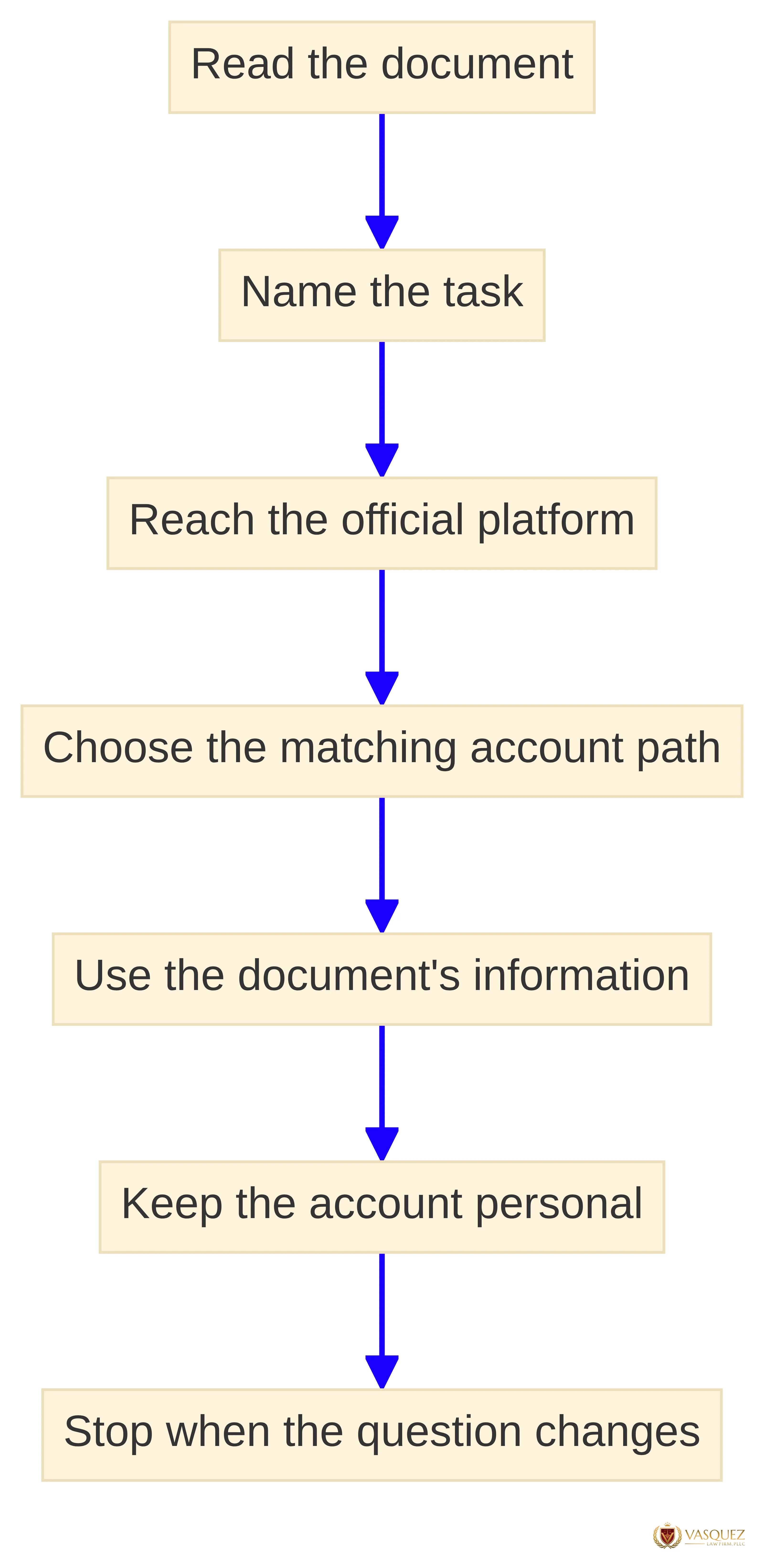
A verification-first checklist keeps the agency, document, website, and task connected before you enter information. Work through the following order each time you face an unfamiliar account instruction:
- Read the document. Identify the agency name, application or proceeding, receipt number, case number, and any instruction that refers to online access.
- Name the task. Decide whether you need a USCIS case alert or account function, detailed EOIR proceeding access, or limited EOIR status information.
- Reach the official platform. Start from the responsible agency’s official website or the official address associated with that agency, rather than relying on a message that sends you to an unfamiliar page.
- Choose the matching account path. USCIS provides separate routes to sign in and create an account. EOIR separates the account-based Respondent Access Portal from its no-account automated information system.
- Use the document’s information. Enter only the information requested by the official page and keep the notice available when the system asks for a receipt, case, or access detail.
- Keep the account personal. USCIS says each person should use an individual account and should not share it with family or friends.
- Stop when the question changes. If the problem becomes “What does this notice mean for my case?” rather than “How do I access the account?”, move from technical instructions to case-specific assistance.
Account screens and instructions can change, so check the official agency page on the day you act. Do not fill gaps in an unfamiliar process with instructions from a different agency, a different country, or an older message. If the official page does not clearly match the agency and matter named in your document, pause and preserve the document before taking another step.
Keep a simple record of the date you tried to sign in, the agency involved, the document or receipt you used, and the exact access problem. Save confirmation screens or error messages when the official system provides them. That record gives technical support a concrete starting point and helps separate an access failure from a question about the immigration matter itself.
Use the minimum information needed for the task and avoid entering personal details into a page whose agency you cannot identify. A familiar logo or a message that uses your name does not replace the agency match. Stop if the address, document instructions, and requested task do not fit together.
Handle sign-in, linking, and access problems through the agency
USCIS accepts messages through an online webform for account problems such as a password reset or Online Access Code issue. USCIS generally says it responds to these messages by email or phone within 48 hours. USCIS also says staff have limited ability to share case-specific information outside the secure online account experience, so a technical response may not answer what a filing or notice means.
Before contacting the USCIS Contact Center, have the relevant receipt notice available and, if possible, keep a copy of the pending or approved application or petition nearby. USCIS says it must verify your identity and confirm your eligibility to receive information before providing information or another requested service. If the Contact Center cannot provide the information or make the requested change, USCIS may schedule an in-person appointment at a field office.
Treat a case-linking problem separately from a forgotten-password problem. Recheck the account path and the information requested for adding a paper-filed case.
Describe the problem precisely when you request technical help:
- You cannot create the account.
- You cannot sign in or complete a password or passcode step.
- You have an access-code problem.
- The paper-filed case will not link.
- You cannot upload a document or complete an online payment.
- You can access the account, but the notice or case information raises a separate question.
These descriptions point to different types of help. Do not combine a login problem with a request for a legal conclusion and assume one response will resolve both.
Use the agency’s technical route when the obstacle is access, linking, a passcode, or an upload screen. Preserve the notice and seek case-specific help when the obstacle affects a filing choice, a court proceeding, a response date, a contact-information duty, or the meaning of an immigration history. Do not treat a successful login as proof that the underlying case question has been resolved.
Keep agency obligations separate from account actions
An account action and an agency obligation are separate questions. For an EOIR matter, EOIR says changes to contact information must be reported to the immigration court or Board of Immigration Appeals within five working days. Do not assume that signing in, viewing a case, or changing a profile automatically completes a notice required for a proceeding.
Keep the original notice, receipt, court document, and relevant confirmation messages together. Record which agency issued each document and which system you used. Note the date of any account action and retain error messages or submission confirmations. That sequence can help you explain what happened without relying on memory.
Keep these questions separate in your notes:
- Access: Can you create the account, sign in, or recover access?
- Case information: What does the agency system display?
- Agency duty: Does a notice require a separate report, filing, or response?
- Legal meaning: How do the facts and documents affect your choices?
The same website may appear in more than one question, but the answer to one does not automatically answer the others.
Know when account help is not legal advice
Technical account help addresses access mechanics. Examples include creating an account, signing in, resetting a password, requesting an Online Access Code, adding a paper-filed USCIS case, or resolving an upload problem. USCIS provides webform and Contact Center routes for these types of problems, subject to identity verification and the limits on case-specific information outside the secure account.
A case-specific question asks what your facts, notice, filing history, or court proceeding means for your choices. An online account can display agency information or provide a submission function, but it does not decide how a notice applies to your history, whether a filing strategy fits your situation, or what response a proceeding requires. The EOIR portal provides access to case information and documents; it does not turn that access into an individualized assessment.
The question has moved beyond account support when you need to understand matters such as:
- Whether a notice requires a response and what that response should address.
- How a prior filing, immigration event, or court proceeding affects your available choices.
- Whether submitting a document could create a consequence for your particular history.
- What a case-status entry means in light of facts that do not appear on the screen.
- How a contact-information change affects your obligations in an EOIR proceeding.
Those questions require the relevant documents and facts, not just a successful login.
Move beyond general account instructions when the issue involves a response date, a court proceeding, a change in contact information, a prior immigration event, a possible filing consequence, or uncertainty about what to do next. Preserve the document and describe the specific question rather than asking only for help with the login. That distinction keeps a technical problem from being mistaken for a legal answer.
Take the next verified step
Your next verified step is to identify the agency named on your document and match the task to that agency’s official system. Use the USCIS path for a USCIS application or paper-filed case, and distinguish the EOIR Respondent Access Portal from the no-account automated information system when your matter is before EOIR. If the issue is technical, use the agency’s account-support route; if the issue concerns how your facts or notice affect your matter, a qualified immigration professional must assess that question.
Keep your notice, receipt, proceeding information, and access record together before you act. A precise agency match reduces the chance of using the wrong platform, while a clear separation between account access and case-specific guidance helps you ask for the right kind of assistance. If your matter is specific to your immigration history or a court proceeding, qualified legal review is the appropriate boundary beyond general account instructions.
What should you do when the correct immigration account is unclear?
What is an immigration account and which agency should I refer to?
An immigration account refers to the online systems used by different immigration agencies, such as USCIS or EOIR. It's important to identify the agency connected to your immigration matter before proceeding.
How do I create a USCIS online account?
To create a USCIS online account, visit the official USCIS account page and follow the prompts for account creation. Ensure you have your receipt number and any necessary information ready.
What should I do if I cannot access my USCIS online account?
If you cannot access your USCIS online account, use the online webform for technical support. Have your receipt notice available, as USCIS needs to verify your identity before providing assistance.
What is the EOIR Respondent Access Portal used for?
The EOIR Respondent Access Portal is used for individuals in immigration proceedings to view case information, download electronic Records of Proceedings, and file case-related documents electronically.
How can I link a paper-filed USCIS case to my online account?
To link a paper-filed USCIS case, sign in to your account, select 'Add a case to your account,' and enter the required information, including your receipt number and Online Access Code if known.
What should I do if my paper case does not link to my online account?
If your paper case does not link, it may be due to the omission of your online account number on the paper form. You may need to create a new account with a different email address, as cases in different accounts cannot be merged.
What is the difference between the EOIR Respondent Access Portal and the Automated Case Information System?
The EOIR Respondent Access Portal requires an account and provides detailed case information, while the Automated Case Information System does not require an account and offers limited information about case status.
Sources
- How do I Get a New Online Access Code? | USCIS — www.uscis.gov
- USCIS Contact Center | USCIS — www.uscis.gov
- Respondent Access Portal Frequently Asked Questions — www.justice.gov
- Chapter 3 - Types of Assistance — www.uscis.gov
- Contact Us | USCIS — www.uscis.gov
- USCIS Online Account | Sign up for a USCIS account — myaccount.uscis.gov
- Home — respondentaccess.eoir.justice.gov